- SkaleBot
- Posts
- 🚀 Skalebot Tech Newsletter – September 2025
🚀 Skalebot Tech Newsletter – September 2025
Introducing Smarter Template Creation

SkaleBot by Deskala
September 19, 2025
We’re excited to roll out a brand-new experience for creating and managing templates inside Skalebot. Whether you’re building marketing campaigns, or customer engagement workflows, our improved Template Builder ensures faster setup, better compliance, and more flexibility.
🛠️ Creating a New Template Just Got Easier
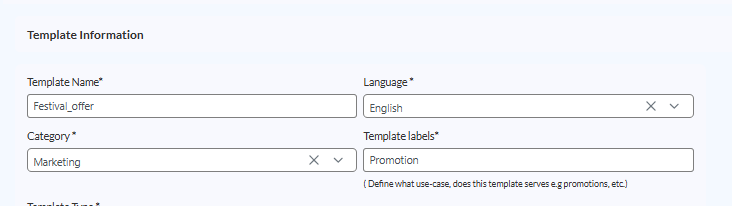
1. Template Information
Template Name – Define a name using only lowercase letters, numbers, and underscores.
Language – Choose from supported languages (starting with English).
Category – Organize templates by purpose (e.g., Marketing, Support, Promotions).
Template Labels – Add meaningful tags to classify use-cases.
2. Template Type Options
Text
Image
Video
Document
Choose the format that best fits your campaign.

3. Content Sections
Header – Optional intro text or title.
Body – Your core message.
4. Variables 🔑 (New!)
Dynamic personalization is now at your fingertips:
Add variables like
{{customerMobile}},{{customerName}}, etc..Assign a Sample Value to preview messages in real time.
Remove variables instantly with the Delete button if not needed.
This ensures every customer sees personalized, context-aware messages without manual edits.

5. Footer
Wrap up your message with a closing note, brand tagline, or disclaimer.
Example: “Thank you for choosing Skalebot!”
Fully customizable for your campaign needs.

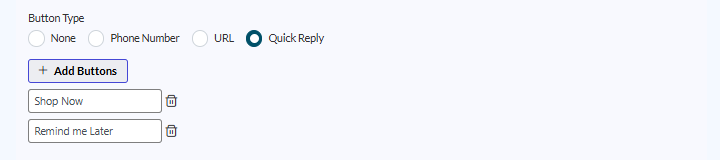
6. CTAs (Call-to-Actions)
Drive engagement with interactive buttons:
Phone Number – Direct customers to call instantly.
URL – Send them to your website, product page, or booking link.
Quick Reply – Let customers respond with a tap.
None – Keep it simple if you don’t need a CTA.
Once you’ve entered all details, Skalebot instantly generates a live preview so you know exactly what your customers will see.
✨ Why This Matters
Save time with a structured template creation flow.
Personalize customer engagement with dynamic variables.
Improve message delivery rates with built-in compliance tools.
Keep campaigns consistent and organized across your team.
💡 Pro Tip: Always preview your template before finalizing — the editor now shows exactly how customers will see your message with variables replaced by sample values.
📢 Available Now: Head to your Skalebot dashboard and create your first template today.